✦ Endor Revived Marketplace ✦
Buy, sell and auction items directly with other players on the Endor Revived UO shard.
Powered by AI scanning, live auctions and Discord integration.
—
—
—
—
—
⏳
How to Get Started
▼
RECENT LISTINGS
⏰ AUCTIONS ENDING SOON
🔨 LATEST CRAFT ORDERS
💬 MARKET CHAT
DISCORD
Loading…
🔥 TRENDING THIS WEEK
FEATURES
AI Item Scanning
Upload a screenshot of any item and AI fills in the name, type, rarity, stats and properties automatically. Supports Claude and Gemini.
Live Auctions
Bid on items in real time. Anti-sniping: bids in the last 60 seconds extend the auction by 2 minutes. Buyout option available.
Guild Listings
Mark any listing as visible only to your guild members. Guild-only items are completely hidden from non-members, even in Discord bot searches.
Karma & Reputation
Rate traders after every completed deal. Build your reputation with 👍/👎 ratings. Negative ratings require a written reason. Six rank tiers.
Offer System
Make counter-offers on any WTS listing directly from the site. Seller gets a Discord DM instantly and can accept or decline with one click.
Guild Storage
A private shared stash for each guild. Deposit spare items for free pickup by guildmates. Only visible to guild members.
Leaderboard
Top 10 traders by karma, sales volume and active listings. Click any name to open their seller profile.
Set Tracker
Shows which set pieces are currently listed for each class. Green = available with price. Grey = not listed. Find the missing piece for your build.
Craft Orders
Request custom-made items from craftsmen. Post what you need, a craftsman claims it and agrees on price and timeframe, then delivers in-game or via FEN.
⚔ Market Listings
| Item Name | Type | Qty | Price | Seller | Expires |
|---|
Consulting the oracles…
🔥 Auction House
Summoning auction lots…
✦
Drag & drop · paste (Ctrl+V) · or click to browse
🏪 My Trade Hub
| Item | Type | Price | Qty | Listing | Status | Actions |
|---|
Loading thy wares…
| Item | Type | Start Bid | Current Bid | Buyout | Bids | Ends | Actions |
|---|
⚙ Admin Dashboard
USER MANAGEMENT
Roles: seller = trade+bid+AI scan · admin = full access
| Username / Nickname | Role | Guilds | Ban | Listings | Karma | AI | Joined | Analyst | Actions |
|---|
Loading users…
ALL LISTINGS (LAST 300)
| Item | Seller | Type | Price / Bids | Status |
|---|
Loading listings…
REPORTED LISTINGS
| Reporter | Item | Owner | Reason | Date |
|---|
Loading reports…
AUDIT LOG (LAST 200)
| Admin | Action | Target | Details | Date |
|---|
Loading audit log…
👎 NEGATIVE RATINGS LOG
⚖️ TRADE DISPUTES
💰 PENDING PRICE SUBMISSIONS
Loading…
📋 SELLER ACCESS REQUESTS
⚙️ SITE CONFIGURATION
Loading…
📊 Market Analytics
📖 Help & Guide
✦ Discord Server & Bot
The Endor Bazaar has a dedicated Discord server where new listings are announced, auctions are tracked, and the Bazaar bot is available. Join to get notified about listings, use slash commands to search without opening the website, and contact admins for role requests.
🔗 Join the Bazaar Discord Server
Bot Commands (use in the bot channel):
/search
Search active listings by item name. Optional type filter.
/price
Show sold price history for an item over the last 30 days.
/listings
Show all active listings for a player. Leave the user field empty for your own.
To get the Seller role or join a Guild on the Bazaar, join the Discord server and ask an admin. The Seller role grants trading access and takes effect on your next login to the website.
✦ Site Features
⚔ Browse & Buy
Browse all active listings. Filter by type, rarity, seller or search by name. Open any item for full details, properties and auction history.
🔥 Auction House (seller role required to bid)
Live auction listings with countdown timers, bid history and buyout option. Winners and sellers are notified via Discord DM when the auction ends. Bids placed in the last 60 seconds automatically extend the auction by 2 minutes to prevent sniping.
✦ Add Listing (seller role required)
List items for direct sale or auction. Upload a screenshot and use AI Scan to fill properties automatically. Listings are posted to the guild Discord channel.
📜 My Listings (seller role required)
Manage your active listings — edit, delete or mark as sold. Share your full inventory as a formatted Discord message. View sold item history.
🧩 Set Tracker
Browse > Set Tracker tab shows all item sets and which pieces are currently listed. Green checkmark = available with price and a View button. Grey = not listed. Filter by class. Progress bar per set.
🏆 Leaderboard
Top 10 traders in three categories: Karma Champions (highest reputation), Top Sellers (most items sold), and Most Active (most current listings). Click any username to open their seller profile.
💬 Offer System
Make counter-offers on any WTS listing. The seller receives a Discord DM and can Accept or Decline from My Listings → Pending Offers. Requires Bazaar Discord server membership.
🏰 Guild Storage
A private shared stash for each guild. Members deposit spare items for free pickup by guildmates. Use the Guild Storage tab on the Add Listing page to deposit. Items can be claimed or released. Expires automatically after 30 days.
🔨 Craft Orders (seller role required to post or claim)
Browse → Craft Orders: post a request for any item from the Alchemy, Tailoring, Blacksmithy, Engineering or Cooking catalog — pick material/quality where it applies, set your price and delivery method. Any craftsman can claim it, propose a price and production time, and you accept or counter. A private Discord thread opens once you agree. Missing an agreed deadline affects karma.
✦ Roles & Access
Not logged in
Browse listings and view item details only.
Member
Browse, message sellers via Discord, report listings, manage account settings.
Seller
Everything above + create listings, place bids, use AI Scan (requires API key). Contact an admin to get the seller role.
Admin
Full access — manage users, roles, bans, delete any listing, view audit log.
🔒 Guild Listings
Sellers can mark any listing as visible only to members of their guild. Guild-only items show a 🔒 icon in the browse list and are completely hidden from everyone outside that guild — including in Discord bot search results.
Guild membership is tied to your Discord role on the Bazaar server. Contact an admin on Discord to be assigned to your guild. The change takes effect immediately after your next page refresh — no re-login needed.
✦ Karma & Trader Reputation
After an auction ends, both the seller and winner can rate each other with a thumbs up 👍 or thumbs down 👎. Ratings are visible on every seller profile. Negative ratings require a written reason. The rating window is 14 days after the auction ends.
0–2 trades
New Trader
⭐ score 3–9
Apprentice
⭐⭐ score 10–24
Trusted
⭐⭐⭐ score 25–49
Reputable
👑 score 50+
Elite Trader
⚠ score < 0
Untrusted
Ranks require at least 3 received ratings. Until then the trader shows as New Trader regardless of score.
✦ AI Scan — How It Works
The Scan Properties button reads item information from a screenshot and fills the listing form automatically. It requires a seller or admin role and a personal API key set in ⚙ Settings.
Tips for best results:
- Take a clean in-game screenshot — no UI overlays covering the item tooltip.
- Make sure the full item name, all properties and level requirement are visible.
- For scrolls: the scroll name must be fully visible (e.g. "Runeword Scroll of Valor").
- Crop tightly around the item tooltip for faster and more accurate results.
- After scanning, always review and adjust the filled values before publishing.
✦ Supported Item Types for Scanning
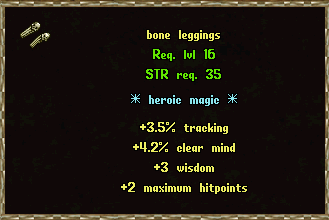
 Magic, Rare & Imbued Items
Weapons, armor, shields and other items with blue or yellow names. Scans name, type, level req, item power and all properties.
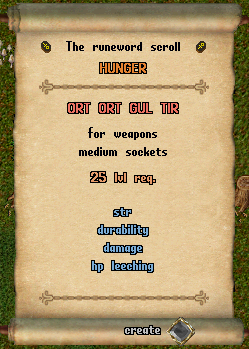
 Runeword Scrolls
Reads the runeword name from the scroll, then looks it up in the database and fills runes, socket type and level requirement automatically.
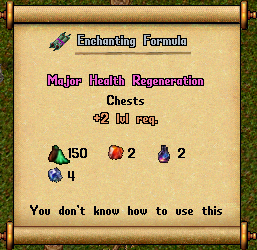
 Enchanting Scrolls
Detects enchantment name, slot and level. Matches to the enchantment database and fills all fields including the bonus description.
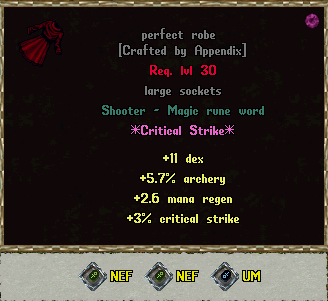
 Runeword Items
Items with a runeword applied (green name). Scans the base item name, runeword name, type and level requirement.
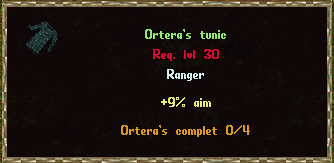
 Set Items
Detects set name and piece slot. Automatically selects the correct set, tier and piece from the database and fills all set properties.
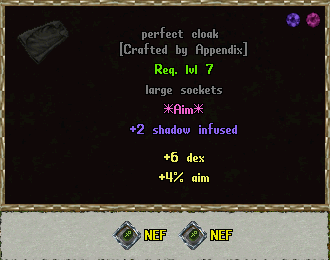
 Socketed Items (with Runes)
Common weapons, armor and shields with individual runes inserted (not a runeword). Detects socket count, socket size and each rune name from the rune icons visible at the bottom of the tooltip. The item is listed as Socketed [Base Name].
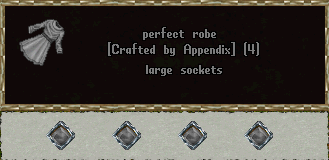
 Empty Socketed Items
Common weapons, armor and shields with unfilled sockets, identified by a [N] bracket in the item name. Detects socket count and size, names the item Socketed [Base Name] [N] and adds a socket property line automatically.
⚠ Marketplace Rules
I.
Treat all traders with respect. Harassment, insults or toxic behaviour will not be tolerated.
II.
List items seriously. Fake listings, joke prices or placeholder items are not allowed.
III.
Honor your trades. If you win an auction or agree to a sale, follow through. Backing out without reason is considered bad faith.
IV.
Do not manipulate the karma system. False positive or negative ratings are subject to admin review and removal.
V.
Breaking any of these rules may result in a permanent ban from the Bazaar at the admin's discretion.
🏆 Leaderboard
Loading…
🏰 Guild Storage